
ShiftConvert
Change the format. Images, PDFs, video and audio each get their own list.
New in 0.5 · Fit video to any upload limit See what's new
Drag files in File Explorer and press Shift, Ctrl or Alt. A wheel opens under the cursor. Drop on a choice and a new file is saved next to the original.
14-day trial with every feature. Pay once, use on up to 3 PCs.
Shift pressed mid-drag. Release on JPG.
You already drag files around. Shiftwheel adds one key press to that drag.
In File Explorer, as you normally would. One file or a whole selection.
A wheel opens under the cursor. It only shows options that fit the files you are holding.
The result is saved as a new file next to the original.
Each key opens a different wheel, with options for the files you are holding.
Change the format. Images, PDFs, video and audio each get their own list.

Work on the file. Compress, resize, crop, trim, split, merge, zip or extract.

Do something with it. Copy, copy the path, open a terminal, move, copy to, show.
The wheel changes with what you drag. These are the options for each kind of file.
Photos, screenshots and scans. HEIC and AVIF open through Windows itself.
Shift Convert
Ctrl Tools
Turn a PDF into something else, or work on the document itself.
Shift Convert
Ctrl Tools
Clips from a phone, a camera or a screen recording. Windows' own media engine does the work.
Shift Convert
Ctrl Tools
Voice notes, recordings and music files.
Shift Convert
Ctrl Tools
Archives, folders and any other file.
Ctrl Tools
The Actions wheel works on anything you drag.
Alt Actions
Many forms, chats and email services cap the size of a video. Drag the clip, press Ctrl and rest on Fit size.
Shiftwheel saves a smaller MP4 next to the original. The same wheel can trim, split into 2, 3 or 4 parts, mute, join clips, save frames or drop to 720p.
Rest on a segment with three dots and a second ring of settings opens. Choose Custom for a small window with a preview and exact numbers.

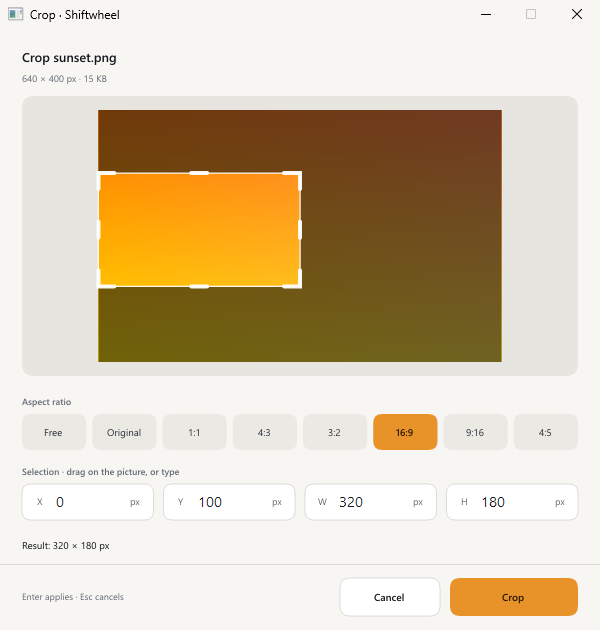
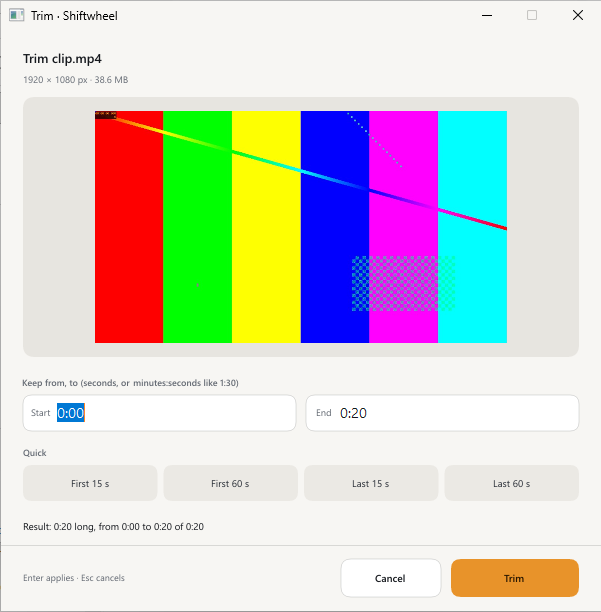
Every conversion and tool runs on your own machine. Windows' own engines handle HEIC, AVIF, PDF pages, video and audio, Shiftwheel bundles no codecs.
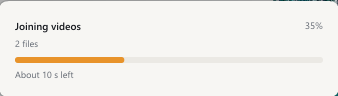
Shrinking a long video or splitting a big PDF takes a while. A small card above the tray shows a bar, the percentage and the time left.
Keep working while it runs. The new file appears next to the original when it is done.
Try every feature free for 14 days. If it is useful, buy a licence for US$19. There is no subscription.
Free for 14 days
US$19 one time
Checkout is in test mode right now. No real payment is taken and the key is for testing.
Dodo Payments is the merchant of record and handles checkout and tax.
Windows 10 (version 1809 or later) and Windows 11, 64-bit. Windows 11 on ARM runs it under emulation, which is not tested yet. Windows 10 on ARM and S mode are not supported.
The beta is not code-signed yet. Choose More info, then Run anyway. You can check the download against the published SHA-256 checksum first. On PCs with Smart App Control turned on, Windows blocks unsigned apps, so Shiftwheel can't run there yet.
Nothing. Shiftwheel always writes a new file next to it and never changes the original.
No. Every conversion and tool, including reading text from images, runs on your PC.
Images (JPG, PNG, WebP, BMP, TIFF, GIF, ICO, plus HEIC and AVIF in), PDF, video, audio, ZIP, TAR, TAR.GZ and GZ archives, and folders. The features page lists every option.
Yes. Drag the video, press Ctrl and choose Fit size. Pick under 10, 25, 50 or 100 MB, or type any size.
Shiftwheel uses Windows' own engines and bundles no codecs. Install Microsoft's free HEIF Image Extensions for photos and HEVC Video Extensions for iPhone video from the Microsoft Store. Windows N editions also need the Media Feature Pack for video and audio.
The key arrives by email from Dodo Payments. Right-click the Shiftwheel tray icon, choose Enter licence key and paste it.
Up to 3 of your own PCs. To move to a new PC, right-click the tray icon on the old one, choose Remove licence from this PC, then enter the key on the new one.
Yes, all 1.x updates are included with the licence.
Contact us about a refund through the contact page. See the refund policy.
Leave your email for a short note when a new version is out. We only email about Shiftwheel.