Download
Shiftwheel for Windows
A free 14-day trial with every feature. After that, a one-time US$19 licence keeps it working on up to 3 of your PCs.
Windows beta 0.5.0
Windows 10 and 11, 64-bit · ZIP archive
Check the file before running it. The SHA-256 checksum is listed in SHA256SUMS.txt. In PowerShell: Get-FileHash .\shiftwheel-0.5.0-windows-x64.zip
System requirements
- Windows
- Windows 10 version 1809 or later, or Windows 11. 64-bit (x64)
- Uploads
- None. Everything runs on your PC
- HEIC, AVIF
- Microsoft's free image extensions from the Microsoft Store
- iPhone video
- Microsoft's HEVC Video Extensions. N editions also need the Media Feature Pack
Windows 11 on ARM runs it under emulation (not tested yet). Not supported: Windows 10 on ARM and S mode. No codecs are bundled; Shiftwheel uses Windows' own engines.
Install in four steps
Unzip
Right-click the ZIP and choose Extract All. Put the folder somewhere permanent, such as your Documents.
Run shiftwheel.exe
Double-click it. There is no installer.
Get past SmartScreen
The beta is not code-signed yet, so Windows may warn you. Choose More info, then Run anyway.
Find the tray icon
Shiftwheel runs in the system tray. Drag a file in File Explorer and tap Shift to try it.
Smart App Control
If Smart App Control is turned on, Windows blocks apps that are not code-signed and offers no Run anyway button. Shiftwheel can't run on those PCs until it is signed. You can check the setting in Windows Security under App and browser control.
Free for 14 days, then a licence
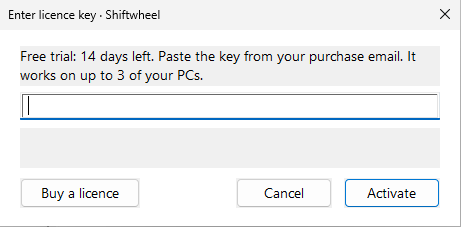
The trial has every wheel and tool. When you buy, your licence key arrives by email from Dodo Payments, the merchant of record.
- Right-click the Shiftwheel icon in the system tray.
- Choose Enter licence key.
- Paste the key from the email.
One licence covers up to 3 of your PCs. Moving to a new PC? On the old one, right-click the tray icon and choose Remove licence from this PC, then enter the key on the new one. Updates for 1.x are included.
Checkout is in test mode right now. No real payment is taken.